Images and videos in one workspace

Vmake Watermark Remover for Images and Videos

Remove a visible Vmake watermark from an image or video you own or are authorized to edit. You can also use AIAI.COM as an online Vmake Watermark Remover alternative for logos, text, moving marks, transparent overlays, and other visible watermarks.

Upload a Video with a Visible Watermark

Batch upload up to 10 videos at once. Supports MP4, MOV, M4V, MKV and WEBM. Videos up to 500MB. Only upload content you own or are authorized to edit.

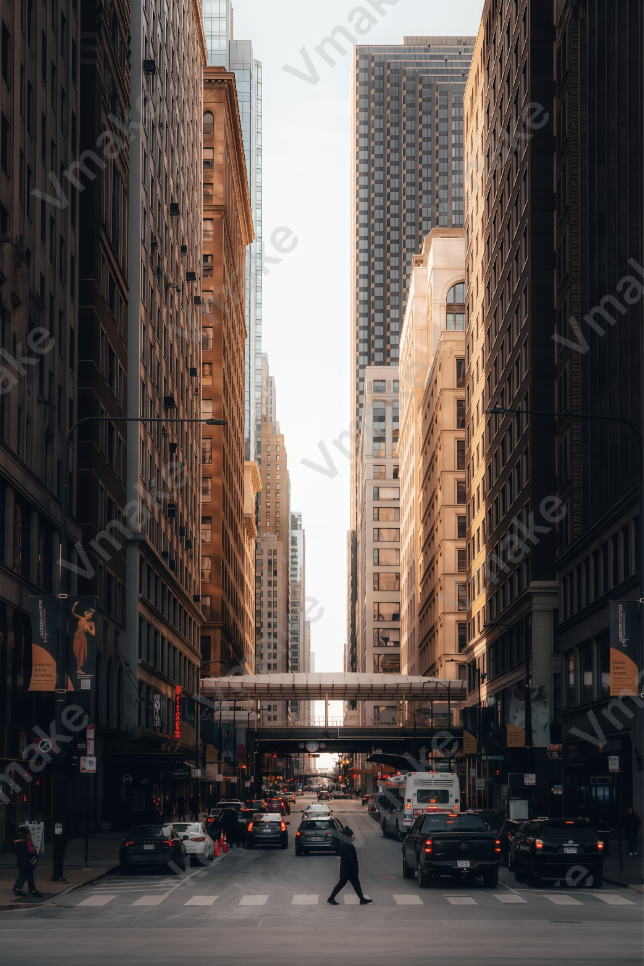
Vmake export image with repeated visible watermarks

Remove a Watermark from a Vmake Export

Already created an image or video with Vmake but only have a watermarked export? Upload the authorized file and process the visible Vmake mark without rebuilding the project from the beginning.

If the original Vmake project is still available and your plan allows a clean export, re-exporting from the source project is usually the most accurate option.
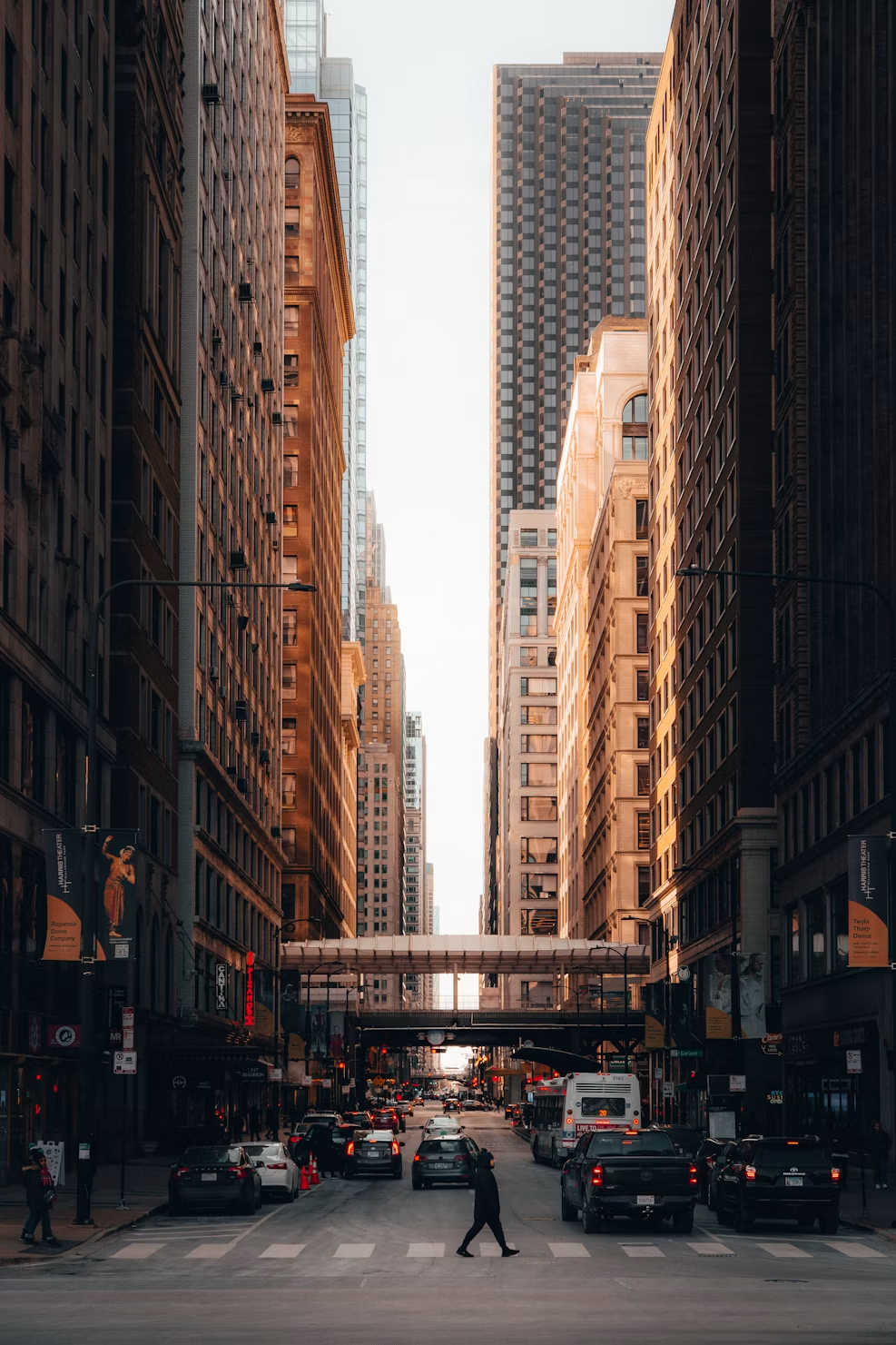
Vmake export image without a visible watermark

Use AIAI.COM as Your Watermark Remover

Looking for the watermark removal function associated with Vmake? AIAI.COM provides another online workspace for removing visible watermarks from supported images and videos. Use it for Vmake content or for files carrying marks from other platforms.

Both needs use the same upload and preview workflow on this page.

Supports images and videos in one workspace. Videos must be no larger than 500MB.

Preview before download

See Vmake Watermark Removal in Action

Compare the original Vmake export with the processed result. The image example shows how a visible mark is removed from a still frame, while the video example shows the restored area as the scene changes over time.

Vmake Watermark Removal from Video

Watch the watermark area across the full clip and check for remaining edges, flicker, soft patches, or unstable details.

Play the complete before-and-after video instead of checking only the thumbnail. Look at the opening, movement, scene transitions, and every frame where the watermark overlaps a different background.

Vmake Watermark Removal from an Image

Image with repeated Vmake watermarks before removal Clean image after Vmake watermark removal Before After

Inspect the cleaned area at full size and compare nearby textures, colors, edges, and fine details with the original image.

Remove Vmake and Other Visible Watermarks

Use one online workspace for visible marks that stay in place, move through a scene, blend into the background, or change over time.

Example image with a fixed Vmake logo in the corner

Fixed Logos and Corner Marks

Remove a visible logo or platform mark that remains in one part of an image or video.

Example image with a Vmake logo moving across the scene

Moving Watermarks

Process a watermark, logo, or text overlay that changes position while a video plays.

Example image with a transparent Vmake logo

Transparent Watermarks

Clean semi-transparent text and graphics that allow the original scene to remain partly visible underneath.

Example image with a Vmake logo that changes position

Dynamic Text

Remove changing text, usernames, labels, and other visible overlays that appear at different moments in a video.

Example image with repeated Vmake watermarks over a detailed street scene

Complex Watermarks

Process marks placed over people, products, movement, detailed textures, or changing backgrounds. Results vary with the amount and complexity of visual information hidden by the watermark.

One Workspace for Images and Videos

01

Work Online

Upload and process a supported file in your browser without installing desktop editing software.

02

Switch Between Images and Videos

Use the same page for a watermarked image or video instead of moving between separate products.

03

Review the Credit Estimate

See the estimated credit use before video processing begins. New AIAI.COM accounts receive 20 credits to test the effect; payment or a subscription is required to download.

04

Preview the Result

Inspect the processed image or play the complete video before deciding whether the result meets your needs.

05

Upload Short Videos up to 500MB

Process supported short videos within the 500MB per-file limit. High-bitrate, 4K, or long compilation files may exceed this limit.

When AIAI.COM Fits Your Workflow

01

You Only Have a Watermarked Vmake Export

Process a finished image or video when the editable Vmake project is no longer available and you have permission to modify the export.

02

You Work with More Than One Platform

Use one removal workspace for visible marks from AI generation tools, social platforms, stock media services, and other authorized sources.

03

Your Video Contains a Moving or Transparent Mark

Check the complete result when a watermark shifts position, changes with the scene, or blends into the background.

04

You Want to Test the Result Before Downloading

Review how the watermark area was reconstructed before committing to the processed file.

Vmake Watermark Remover or AIAI.COM?

Vmake LabsAIAI.COM
Includes watermark removal within a broader social video creation and editing platform.A focused option when your immediate task is removing a visible watermark from an image or video.
May be the natural choice when you already use its workspace and want its other UGC, generation, enhancement, or editing features.Supports Vmake exports as well as moving marks, transparent overlays, dynamic text, logos, and watermarks from other platforms.

Choose based on the file you have, the watermark type, the workflow you prefer, and the result you see in preview. AIAI.COM does not claim to be Vmake Labs or replace every feature in the Vmake platform.

Three-step workflow

How to Remove a Watermark Online

01

Upload an Image or Video

Choose a supported file that you own or are authorized to edit. Videos must be no larger than 500MB.

02

Process the Visible Watermark

Start the removal process and let the tool reconstruct the area covered by the visible mark.

03

Preview and Download

Inspect the image or play the complete video. Download the result when the processed area meets your needs.

What Affects Watermark Removal Results?

Results depend on the watermark size, opacity, position, and movement, as well as the source resolution, video compression, background detail, and scene changes. Watermarks covering faces, hands, product edges, text, reflections, or fast-moving objects can be more difficult to reconstruct naturally.

The tool generates a visually plausible replacement from surrounding content. It cannot recover the exact original pixels hidden beneath a watermark, so always review the complete result before using it.

Vmake Watermark Remover FAQ

Vmake Labs offers watermark removal as part of its own media toolkit. This page provides an independent AIAI.COM workspace that can remove visible Vmake watermarks and process other watermarked images and videos.

Yes. Upload a supported Vmake-generated image or video that you own or are authorized to edit. Results depend on the watermark and the content it covers.

Yes. AIAI.COM supports visible watermark removal from short videos up to 500MB per file.

Yes. Images and videos can be uploaded from the same page.

Yes. AIAI.COM provides an independent online workflow for removing visible watermarks. It does not include or replace Vmake's complete collection of video generation and editing features.

Yes. The tool can process visible marks from different AI generation, social media, stock media, and content creation platforms when you have permission to edit the source material.

Yes. AIAI.COM supports moving watermarks, semi-transparent overlays, dynamic text, and other visible marks. Results vary by source file and scene complexity.

Yes. Review the processed image or video before downloading. For video, play the complete clip and inspect every watermark position.

Each uploaded video must be no larger than 500MB.

New AIAI.COM users receive 20 credits to test the processing effect. The available test length depends on the estimated credit use, and payment or a subscription is required to download.

Not always. Large marks, complex backgrounds, fast movement, heavy compression, and watermarks over important details can make natural reconstruction more difficult.

No. AIAI.COM is an independent service and is not affiliated with, endorsed by, or sponsored by Vmake Labs.

Only process content you own or are authorized to edit. Removing a watermark does not grant ownership, copyright, or permission to redistribute the source material.

Remove a Vmake or Other Visible Watermark

Upload an image or video, process the visible watermark online, and preview the result with AIAI.COM.

AIAI.COM is an independent service and is not affiliated with, endorsed by, or sponsored by Vmake Labs.