
Meta AI Image Cleanup

Meta AI Image Watermark Remover

Remove Meta image watermark online in seconds. Clean visible Meta AI logos, corner labels, and text overlays from images while preserving edges, textures, and overall image quality.

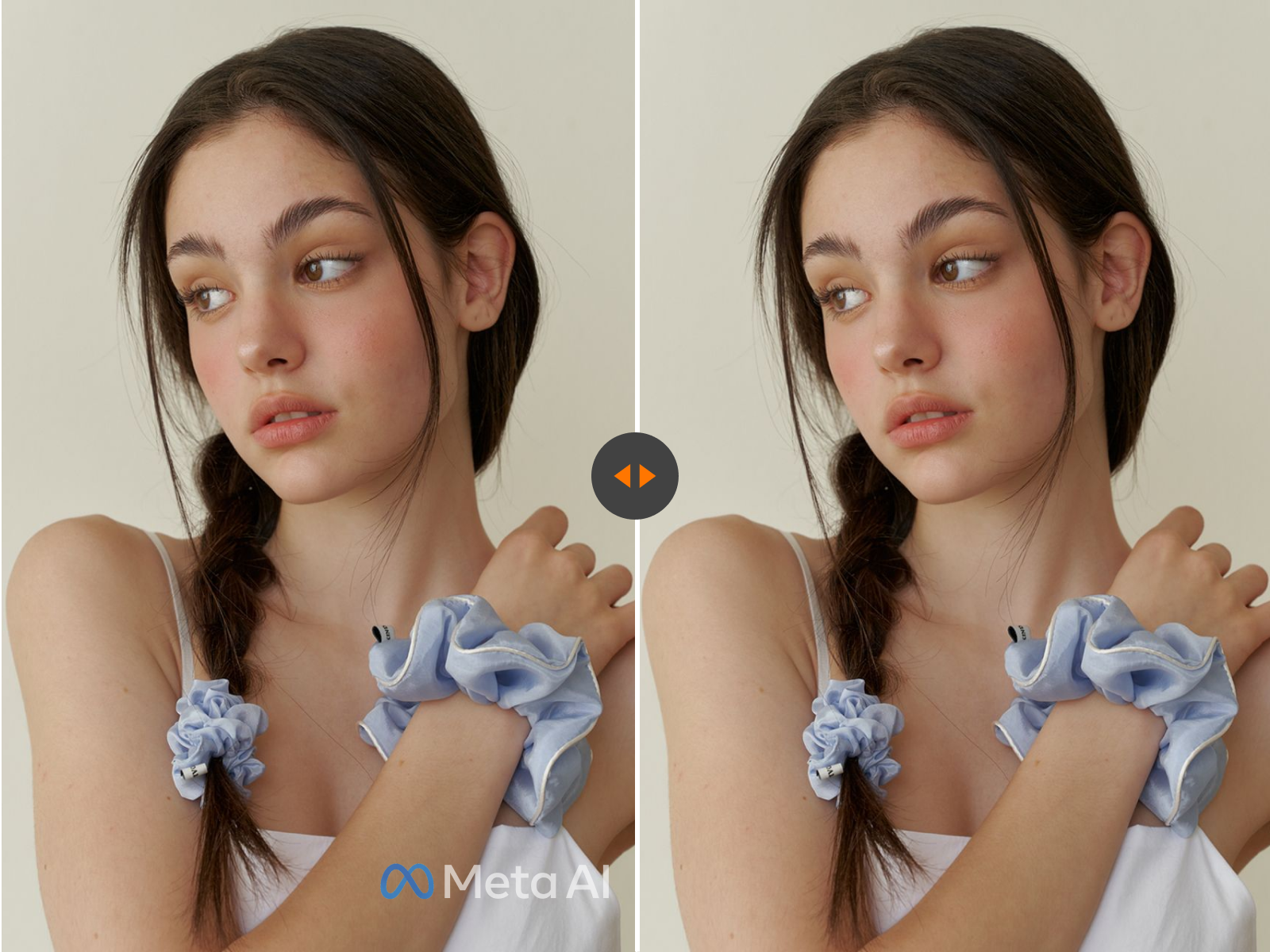
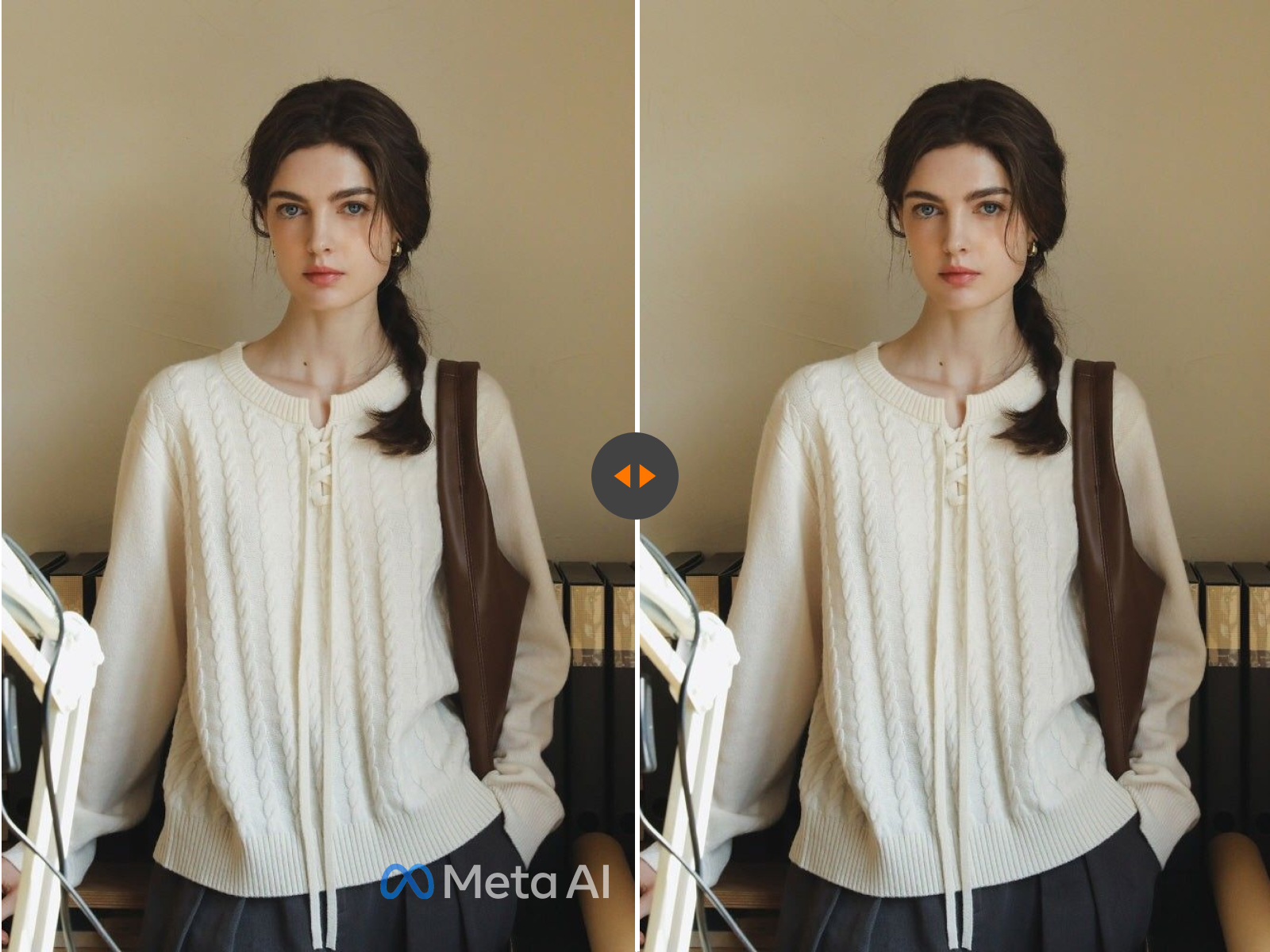
Meta AI image watermark removal demo
Before & After

Upload Image Now

* Supports JPG, JPEG, PNG and WEBP formats, max 10 files at once, maximum file size of 20MB per file.

Visual Cleanup for Meta AI Images

Preview how visible Meta AI labels and corner marks can be cleaned while preserving the surrounding composition, lighting, and texture.

Meta AI watermark cleanup example
Meta AI image texture repair example

What Is a Meta AI Image Watermark?

A Meta AI image watermark can mean two different things. The first is a visible watermark, such as a logo, text label, corner badge, or made with AI style overlay that appears directly on the image. The second is hidden metadata stored inside the file, such as EXIF, XMP, C2PA, or other provenance signals. If your goal is to remove Meta image watermark correctly, it is important to know which type you are dealing with.

Visible watermarks require pixel-level cleanup, usually with AI inpainting or manual retouching. Hidden metadata does not change the appearance of the image, so it is handled through metadata cleaning rather than visual editing.

EXIF XMP C2PA

Can You Remove Meta AI Image Watermark?

Yes. In many cases, you can remove Meta AI image watermark successfully, especially when the mark is small, placed near the edge, or does not overlap complex details like faces, hair, hands, or dense textures. AI-powered cleanup can reconstruct the background and preserve the original composition better than a simple crop.

If the image only contains hidden AI metadata and no visible logo or label, you may not need visual editing at all. In that case, metadata cleanup is the more precise option because it removes file-level signals without changing visible pixels.

Visible Watermark
Hidden Metadata

Best Ways to Remove Meta Image Watermark

If you want to remove Meta image watermark without cutting the frame, AI removal is usually the best balance of speed, quality, and convenience.

AI Watermark Removal

Best for visible Meta AI logos, text labels, and corner marks. This method analyzes surrounding pixels and fills the marked area naturally.

Crop the Image

Useful when the watermark sits near the edge and the image can lose a small portion without hurting composition.

Manual Retouching

Best for difficult images where the watermark overlaps important details and fine control matters.

Metadata Cleaning

Best when the file contains hidden AI metadata only. This does not remove visible watermarks from the image itself.

See the Difference Before You Download

A good Meta AI Image Watermark Remover should do more than hide a logo. It should rebuild the missing area so the image still looks natural at full size.

Before and After: Corner Logo on AI Art

A small Meta AI corner watermark is one of the easiest cases to clean. The tool removes the visible mark, reconstructs the surrounding background, and keeps the full frame intact without forcing a crop.

Before and After: Label on a Social Graphic

When a Meta AI label sits over a flat or lightly textured background, AI cleanup can blend the repaired area smoothly so the final image looks presentation-ready for internal decks, planning boards, or creative review.

Before and After: Watermark on a Product Mockup

If the watermark overlaps a simple product backdrop, the remover can rebuild gradients, shadows, and negative space while preserving the subject and layout.

Before and After: Watermark on a Complex Scene

Detailed scenes with fabric, hair, reflections, or layered textures are more challenging, but a strong repair workflow can still reduce visible artifacts and recover a cleaner result than basic cropping.

How to Remove Meta AI Watermark from an Image

01

Upload Your Image

Select the Meta AI-generated image that contains the visible watermark, logo, label, or corner mark.

02

Detect or Select the Watermark Area

The tool can automatically detect common watermark regions. You can also refine the selection manually for more precise cleanup.

03

Preview and Download

Review the repaired area, check edges and textures, then export a clean image in high quality.

04

Choose Metadata-Safe Export if Needed

If your goal also includes removing hidden AI metadata, export with the appropriate cleanup option so the final file is visually clean and stripped of unnecessary embedded tags.

Why Use This Meta AI Image Watermark Remover?

Clean visible Meta AI marks in the browser while preserving more of the original composition.

Clean Visible Meta AI Marks

Remove corner logos, labels, and overlays without relying on heavy cropping.

Preserve Image Quality

Maintain natural textures, lighting, and edge detail for a cleaner final result.

No Design Software Needed

Skip complex editing tools and remove Meta image watermark directly in your browser.

Supports Popular Formats

Works with JPG, JPEG, PNG, WebP, and HEIC image files.

Better Than Basic Cropping

Keep more of your original composition, especially when the watermark overlaps useful content.

Useful for Creative Workflows

Perfect for social assets, concept images, design references, moodboards, product visuals, and presentation graphics.

Common Use Cases

This Meta AI Image Watermark Remover is useful for people who want to clean AI-generated visuals before reusing them in creative workflows. Common use cases include removing a Meta AI logo from a concept image, cleaning corner labels from a social post draft, restoring a mockup for internal review, improving screenshots for presentations, and preparing generated images for design boards or content planning.

It is especially useful when cropping would cut away important parts of the image. Instead of trimming the frame, AI cleanup can preserve the full composition while reducing visible branding artifacts.

Meta AI image cleanup use cases

Visible Watermark vs Hidden AI Metadata

Many pages confuse visible watermarks with invisible AI metadata, but they are not the same thing.

Visible Watermark

A visible watermark appears directly on the image. Examples include a Meta AI logo, a text label, a corner badge, or an overlay. To remove it, you need image editing or AI inpainting.

Hidden Metadata

Hidden metadata is stored inside the image file. Examples include EXIF, XMP, C2PA, JUMBF, or generator-related provenance tags. To remove it, you need metadata cleaning, not visual retouching.

Meta AI watermark removal best-case example

When Removal Works Best

Results are usually strongest when the watermark is small, placed in a corner, and does not cross detailed subjects. Images with plain backgrounds, gradients, sky, walls, or other repeatable textures are often easier to repair cleanly.

Results may require extra refinement when the watermark covers faces, hair, fingers, typography, thin lines, reflections, or high-detail patterns. In these cases, one-click cleanup may still help, but manual adjustment often improves the final output.

What Affects Watermark Removal Quality?

A good Meta AI watermark remover should minimize blur, avoid obvious patching, and keep color, lighting, and texture transitions natural.

Watermark size and opacity
Placement over faces, objects, or fine details
Background texture complexity
Original image resolution
Whether the watermark is solid, semi-transparent, or layered
How accurately the selected area matches the marked region

Supported Formats

JPGJPEGPNGWebPHEIC

This tool is designed for modern image workflows and supports common file types used by Meta AI users and creators. Upload JPG, JPEG, PNG, WebP, or HEIC images and export a cleaned result suitable for web, content, or design use.

If your priority is file privacy and metadata reduction, export options should also help reduce unnecessary embedded tags that are unrelated to visible image quality.

Privacy and File Handling

Browser-first flow

Short-lived processing

Metadata-aware exports

Users often want to remove Meta AI watermark from private or unreleased visuals, so privacy matters. A strong browser-based workflow reduces friction and keeps the process simple for quick cleanup tasks. Files should not be stored longer than necessary for processing.

Use Responsibly

Only edit media you own or control

Check platform and license rules

Review rights before commercial use

This page is intended for editing images you own, control, or have permission to modify. Removing visible marks or hidden metadata from third-party content may violate copyright, license terms, platform rules, or disclosure requirements. Before publishing or using a cleaned image commercially, confirm that you have the appropriate rights and that your use complies with relevant policies.

FAQs About Meta AI Image Watermark Removal

Remove Meta Image Watermark Online

Upload your Meta AI image, clean visible marks, and export a cleaner version for creative work, review, or presentation.

Flexible Pricing Plans

Choose the perfect credit package for your needs. No hidden fees.