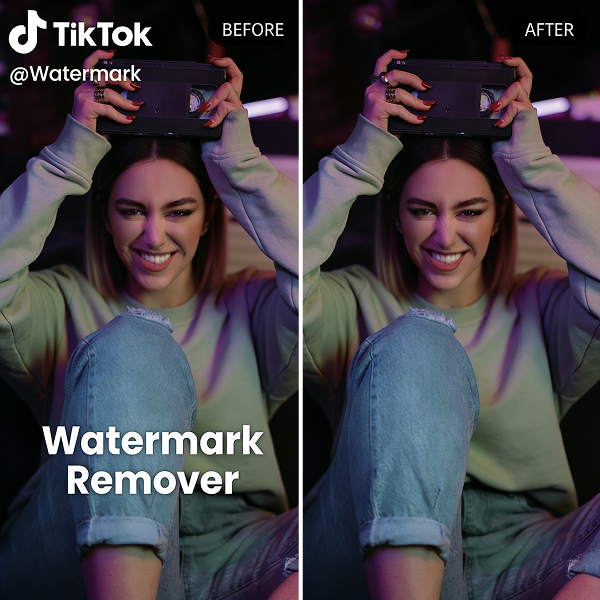
TikTok Watermark Remover is an AI-powered tool that removes TikTok logos, usernames, captions, and other unwanted overlays from saved videos while preserving the original quality.
If you’ve ever downloaded a TikTok video, you’ve probably noticed that the file often includes a moving watermark, account information, and sometimes an ending credit screen. While these elements are useful on TikTok itself, they can become distracting when you’re editing videos, creating compilations, preparing marketing materials, or managing content for different platforms.
Many people try to remove TikTok watermarks by cropping the frame or covering the logo with blur effects. Although these methods are simple, they often reduce image quality and alter the original composition of the video.
A TikTok watermark remover offers a more effective solution. Using AI-powered video inpainting technology, it can identify unwanted elements and reconstruct the area behind them, creating a cleaner result without obvious edits.
In this guide, you’ll learn how TikTok watermark removal works, how AI compares with traditional removal methods, and how to remove watermarks from saved videos using AIAI.com’s TikTok Watermark Remover.
Why Remove TikTok Watermarks?
There are many situations where a clean version of a video is useful. For example:
- Editing existing TikTok content
- Creating video compilations
- Preparing client projects
- Producing marketing materials
- Archiving videos without platform branding
- Reusing footage across different channels
Traditional methods typically involve cropping or blurring. Cropping changes the composition of the video and may cut off important details. Blur effects leave visible traces that can look distracting, especially when the watermark moves across the screen.
AI-powered watermark removal takes a different approach by reconstructing the area behind the watermark instead of simply hiding it.
Traditional Methods vs. AI Watermark Removal
Most watermark removal techniques fall into three categories. Here is a breakdown of how they compare:
| Method | Pros | Cons |
| Cropping | Simple, no additional tools required. | Reduces visible content, changes original framing. |
| Blur / Cover-Up | Quick to apply. | Watermark area remains noticeable, looks unprofessional. |
| AI Video Inpainting | Natural-looking results, preserves original composition, works on moving backgrounds. | Requires AI processing (handled by cloud tools like AIAI.com). |
What Makes AIAI’s TikTok Watermark Remover Different?
AIAI.com uses AI-powered video inpainting technology to remove unwanted elements from videos. Instead of covering the watermark, the system analyzes the surrounding image and rebuilds the missing area as naturally as possible.
Key features include:
Automatic Watermark Detection
The AI can identify TikTok logos, usernames, captions, and other common overlays automatically.
Multiple Element Removal
In addition to TikTok watermarks, the tool can remove:
- Brand Logos
- Text overlays & Subtitles
- Usernames & End screens
Original Quality Preservation
The processed video maintains its original resolution whenever possible, making it suitable for further editing and publishing without pixelation.
Browser-Based Access
No software installation is required. The tool works directly in modern desktop and mobile browsers.
How to Remove a TikTok Watermark From a Saved Video
Removing a watermark takes only a few steps.
Step 1: Upload Your Video
Open the TikTok Watermark Remover on AIAI.com and upload your saved video. Supported formats include MP4, MOV, and WEBM. (Batch uploads are also supported!)
Step 2: Let the AI Analyze the Video
The system automatically scans the video and identifies visible watermarks and overlays. No manual frame-by-frame editing is required.
Step 3: Preview and Download
After processing is complete, preview the result and download the cleaned version of the video.

Pricing and Access
New users can test the tool before purchasing credits. For larger workloads, additional credits can be purchased as needed. This approach provides flexibility for both occasional users and teams that process videos regularly.
[Click Here to Try the TikTok Watermark Remover on AIAI.com]
Frequently Asked Questions
Can I remove a TikTok watermark without cropping the video?
Yes. AI-powered watermark removal reconstructs the hidden area instead of cutting part of the frame.
Will removing a watermark reduce video quality?
The tool is designed to preserve the original resolution whenever possible.
Can I remove usernames and text overlays?
Yes. The AI can detect and remove multiple types of visual elements, including usernames, captions, and logos.
Does it work on iPhone and Android?
Yes. The tool works directly in mobile browsers, including Safari and Chrome.
What video formats are supported?
Common formats such as MP4, MOV, and WEBM are supported. Batch processing for multiple videos is also available.
Final Thoughts
Removing TikTok watermarks doesn’t have to involve cropping, blurring, or complicated editing software.
With AI-powered video inpainting, it’s possible to remove logos, usernames, and other overlays while preserving the original appearance of the video.
If you’re looking for a quick way to clean up saved TikTok videos, AIAI.com’s TikTok Watermark Remover provides a simple browser-based solution that works seamlessly across desktop and mobile